
What does the Client > Get SSN Button Do?
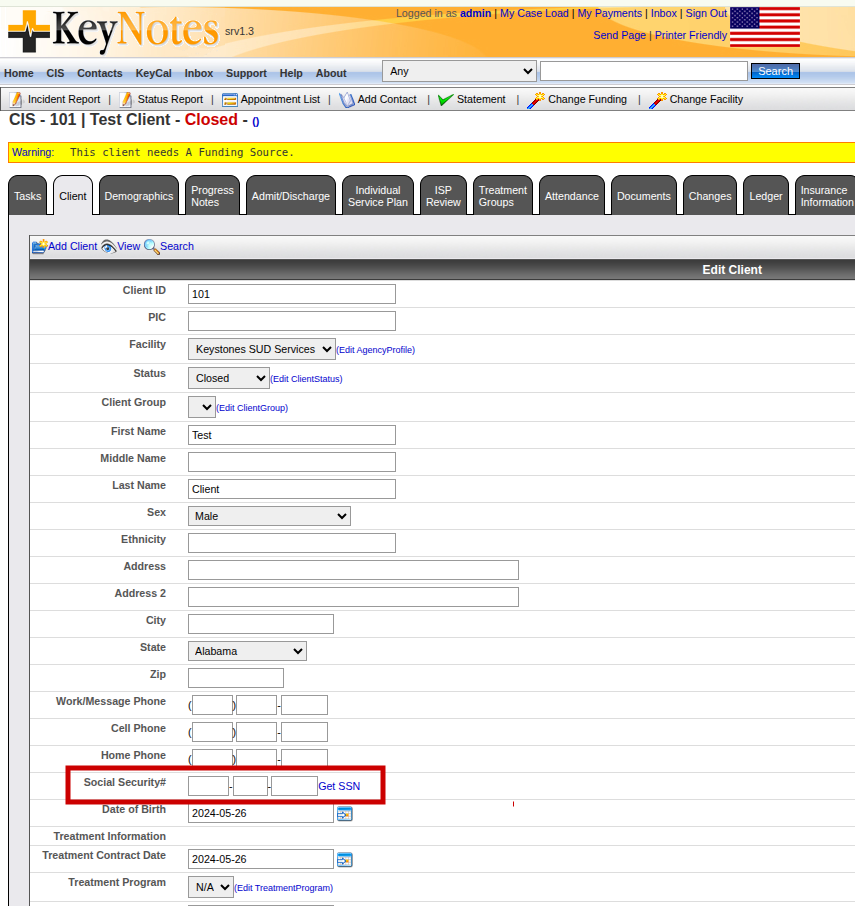
When a new client comes in without a Social Security Number — or refuses to disclose one — the intake worker can click Get SSN next to the Social Security# field on the client demographics form. KeyNotes will generate a unique placeholder SSN and auto-fill it into the three boxes.
How it generates the number
The server pulls the next value from a counter table (_SSN_INDEX) — a single row that gets locked, read, incremented, and written back — then formats it as:
851-11-NNNN for the first 10,000 generated
851-12-NNNN after that
Why 851
Area numbers starting with 8xx (specifically 800-899) have never been assigned by the Social Security Administration. That makes them ideal placeholder values — they’re guaranteed to never collide with a real person’s SSN, but they still pass the basic format check that downstream billing, EDI claims, and reporting systems expect (three digits, two digits, four digits).
Why this matters in a behavioral-health context
Clinical information systems can’t just leave the SSN field blank. It’s used as a unique identifier in billing flows, 837 claim files, and eligibility checks. But behavioral-health intake regularly involves:
Clients who genuinely don’t have an SSN (undocumented, minors, etc.)
Clients who decline to share it (a right they have under HIPAA for most non-billing purposes)
Walk-ins and crisis admits where verifying an SSN isn’t immediately possible
The placeholder lets care begin immediately while keeping the record uniquely keyed. If a real SSN surfaces later, it can be edited in.
What does the “My Payments” button do?
Somebody asked this a few weeks back. Turns out it was broken, but it’s fixed now.
Lets talk about what it does!
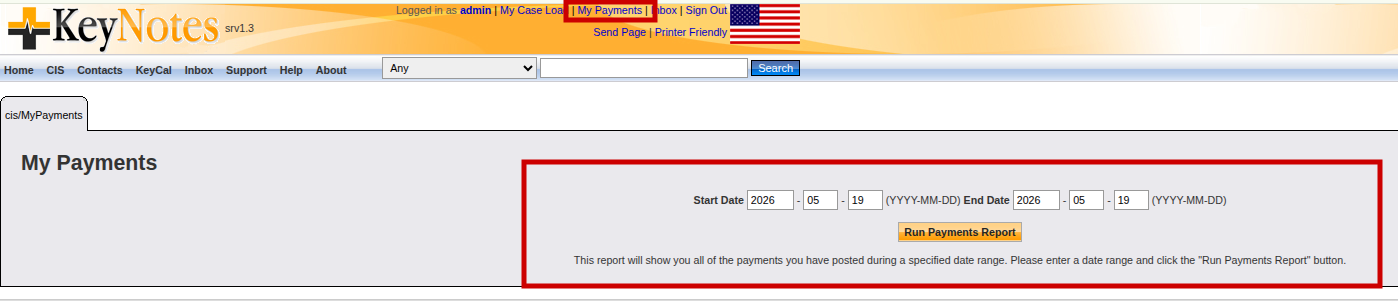
In the top-right of every KeyNotes page, next to “My Case Load” and “Inbox,” there’s a My Payments link. It opens an end-of-shift reconciliation report for whoever is currently logged in.
What it does
You pick a Start Date and End Date, click Run Payments Report, and KeyNotes shows you every payment you personally posted during that window — nobody else’s.
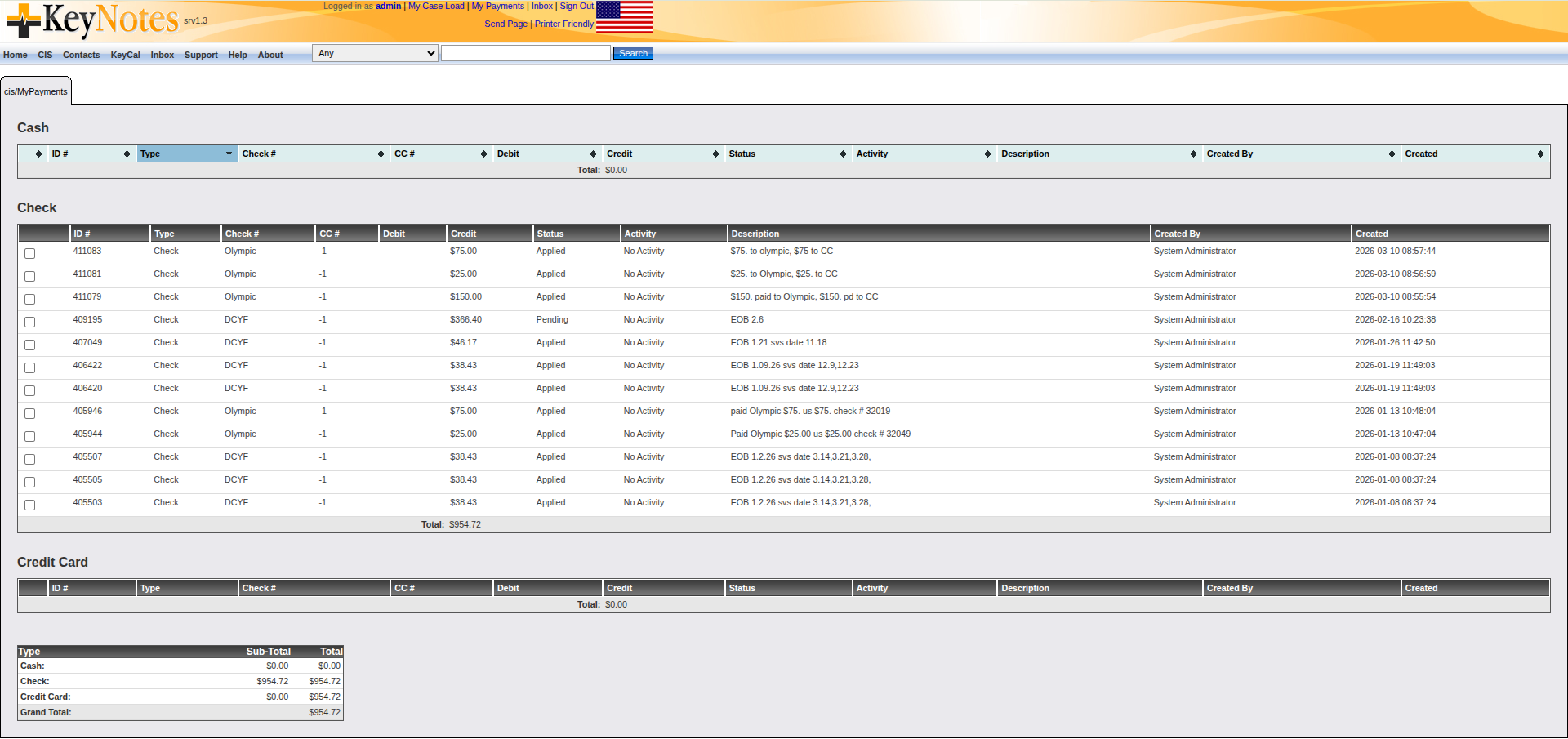
The results are broken out into three separate tables:
- Cash
- Check (with check numbers)
- Credit Card (with the last four digits)
Why this matters in a behavioral-health practice
Front-desk and billing staff at a behavioral-health clinic take payments all day — copays from clients walking in for therapy, balance payments on outstanding accounts, sliding-scale fees, court-ordered treatment payments. By the end of a shift, a single user might have posted dozens of small transactions across all three payment types.
Before depositing the cash drawer or closing out the day, that user needs to answer a simple question: “What did I take in today, and does it match what’s in the drawer?”
My Payments is that answer. It filters the ledger by Created_By = so the report is scoped to one person — making it easy to:
- Reconcile the cash drawer against posted cash payments
- Confirm every check that came in was actually entered into the system
- Verify credit-card batch totals match what was rung through the terminal
- Produce a clean per-shift audit trail that ties payments back to the staff member who handled them
That last point is the important one in a regulated healthcare environment: every dollar that moves through the practice needs to be traceable to a specific user, and My Payments is the self-serve view of that accountability trail.
BUG : Add / Change / Delete Contact does not refresh Client Contacts
Fixed and issue with Client Contacts. When a Contact was Added, Changed or Deleted the Client Contacts did not refresh on close. The user had to refresh or navigate away and come back. This issue has been fixed.
BUG : Group Roster setting wrong Progress Note Type
A user opens a Progress Note for edit in KeyNotes — our open-source CIS for behavioral health. The note was created an hour ago. The browse list clearly says ML IOP. The edit screen’s Type dropdown shows “N/A”.
Looks like a trivial UI bug. It wasn’t.
The Type column on _Notes was being populated from two different tables. Single-client notes stored an Activity Code title (the billing code). Group-attendance notes stored a Group title (the friendly scheduling label). Same column, two vocabularies — and the dropdown only knew about one of them. About 38% of the database had a Type that didn’t exist in the activity code list. The edit screen had been silently defaulting to “N/A” on save for years.
My first impulse was to merge both vocabularies into the dropdown. The customer conversation that followed reframed the whole fix:
A Group isn’t a thing a note belongs to. It’s just a way to create the same note in bulk. The Group provides the roster and a body template. That’s it.
Once you say that out loud, the data model becomes obvious. A Group is an operation, not a category. So the fix was a single UPDATE that rewrote every note’s Type to match its already-correct Activity Code FK, plus ~30 lines of PHP so the group-attendance controller writes the Activity Code title going forward.
Three carry-forwards: bugs in EHRs that look like UI bugs are usually data-model bugs upstream. Two vocabularies in one column is a slow-motion disaster. And five minutes with the customer can save you a refactor.
Walkthrough on YouTube: https://youtu.be/sApsH-XsY8s

Leave A Comment